
Graphics Card and GPU Re-Thermal Service in San Diego. DC Computers, owner-run by Daniel & Chris in Hillcrest since 2009. GPU repaste and re-thermal service for overheating, thermal throttling, loud fans, and shutdowns under load, plus honest diagnosis. NVIDIA GeForce and AMD Radeon, desktop and laptop. (619) 255-4333.
Your Graphics Card & GPU Thermal Service Shop in San Diego
GPU running hot, throttling in games, or louder than it used to be? DC Computers has provided graphics card re-thermal and repaste service in San Diego since 2009. We confirm whether it is really a heat problem before you spend on a new card, and we quote before any work.
Walk-ins welcome · Hillcrest, San Diego · Mon-Fri 9:30am-6:30pm, Sat 12pm-4pm
Trusted GPU Re-Thermal Service in San Diego
A graphics card that runs hot, throttles, or roars under load usually is not dead, it is overheating. Over years of use the factory thermal paste between the GPU chip and its heatsink dries out and the cooler clogs with dust, so the card can no longer shed heat and starts throttling its own performance to protect itself.
Our re-thermal service fixes exactly that: a deep clean, fresh thermal paste, and new thermal pads where needed. We diagnose first to confirm heat is the issue and rule out the cable, slot, power supply, or board, and we quote before any work. If a card has genuinely failed, we do not do board-level chip repair, but we will tell you straight and help you choose the right replacement.
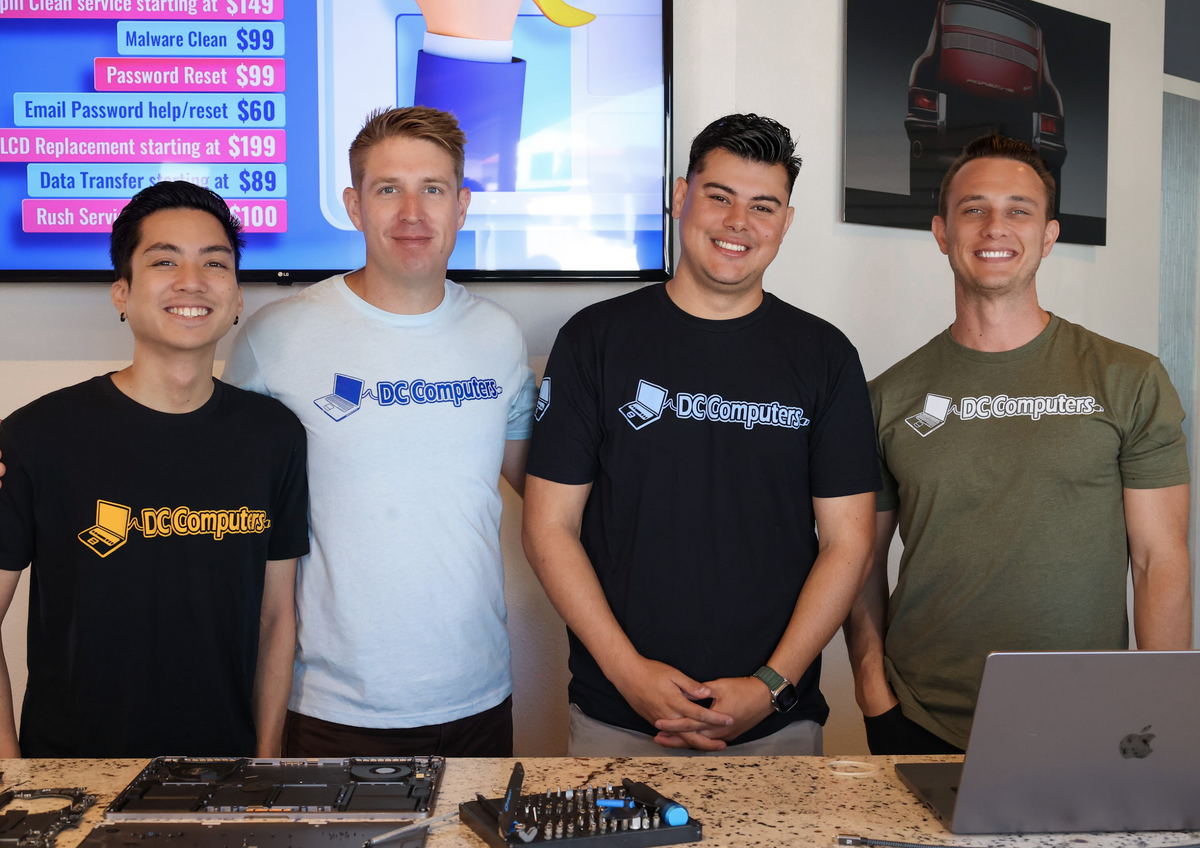
Meet the Team Behind DC Computers
DC Computers is owned and run by Daniel & Chris, yes, the "D" and the "C." We are builders ourselves, so when you hand us a graphics card you are handed to the same crew that installs, tests, and troubleshoots GPUs every single day.
No call centers and no mail-in black holes, just local techs who diagnose honestly, explain your options in plain English, and treat your card (and your data) like it's their own.
Call (619) 255-4333 or stop by the shop in Hillcrest, we're happy to take a look.
Common GPU Problems and How We Help
Most of these come down to heat, and heat is what our re-thermal service fixes.
🔥 Overheating & Loud Fans
Running hot and roaring under load. A deep clean and fresh paste bring temperatures and noise back down.
📉 Thermal Throttling / FPS Drops
Performance tanks the longer you play as the card heats up. A re-paste restores sustained boost clocks.
💥 Heat-Related Crashes & Shutdowns
Black-screen reboots, freezes, or shutdowns under load. Re-thermal service often resolves heat-driven instability.
🧹 Hot & Dusty After Years of Use
Years of dust and dried-out paste leave a card hot and loud. A clean and re-paste brings it back to life.
🖥️ No Display / Black Screen
Could be the GPU, or the RAM, cable, slot, power supply, or board. We diagnose the real cause before you buy a new card.
🌈 Artifacts or a Truly Failed Card
Colored dots, lines, or a card that will not come back. We diagnose honestly. We do not do board-level chip repair, so if the GPU has failed we will tell you straight and help you pick a replacement.
GPU Re-Thermal & Repaste Service: Our Specialty
Re-thermal pasting means cleaning off the degraded, factory-applied thermal paste between the GPU chip and its heatsink and replacing it with fresh thermal interface material (plus new thermal pads where needed). It is one of the most effective things you can do for a hot, throttling card.
❄️ Lower Core & Hotspot Temps
Fresh paste re-establishes efficient heat transfer from the GPU die to the heatsink, commonly reducing temperatures by several degrees.
🔇 Reduced Fan Noise
By moving heat more effectively, the heatsink sheds it faster, so the fans no longer have to spin at maximum, noisy speed.
📈 Consistent, Sustained Performance
Modern GPUs throttle themselves when they get too hot. Cooler components let the card hold higher boost clocks consistently during heavy loads.
🛡️ Increased Component Lifespan
Continually running a card at high temperatures degrades its internal components over time. Keeping thermals in check helps extend the overall life of the card.
If your card is overheating, thermal throttling, or louder than it used to be, a professional re-paste is often the fix. Call (619) 255-4333 for a quote.
How GPU Re-Thermal Service Works at DC Computers
- DiagnosisWe bench-test the card and the system to confirm whether it is a heat and thermal issue or a deeper fault, not guesswork. Walk-ins welcome, no appointment needed.
- Honest QuoteA clear price before any work begins. Call (619) 255-4333 for a quote. No surprises, no hidden fees.
- Re-Thermal ServiceDeep clean, fresh thermal paste, and new thermal pads where needed to restore cooling and stop throttling. If the card has truly failed, we tell you straight and help you choose a replacement.
- Test Under LoadWe stress-test and verify temperatures and performance before pickup, backed by our warranty.
Graphics Cards We Service
NVIDIA and AMD, desktop and laptop, gaming and workstation. We re-thermal what you bring in.
🟩 NVIDIA GeForce
- RTX 50, 40 & 30 series
- RTX 20 series & GTX 16/10 series
- Re-thermal & repaste service
- Overheating & throttling diagnosis
🟥 AMD Radeon
- Radeon RX 9000, 7000 & 6000 series
- RX 5000 & older Radeon cards
- Re-thermal & repaste service
- Heat-related crash & instability diagnosis
💻 Laptop Discrete GPUs
- Gaming laptop GeForce & Radeon GPUs
- Repaste & thermal-pad service
- Overheating & throttling diagnosis
- Honest repair-or-replace advice
🛠️ Workstation Cards
- NVIDIA RTX A-series & Quadro
- AMD Radeon Pro
- Re-thermal & deep-clean service
- Diagnosis & honest guidance
Where heat is the problem, our re-thermal service brings your card back. Where a card has genuinely failed, we do not do board-level chip repair, but we will diagnose it honestly and help you choose the right replacement.
GPU Specialists, Honest About What Helps
We install, test, and run graphics cards every day, in custom builds and in repairs, so we know how a healthy GPU behaves and how a hot, throttling one does. Most cards that feel like they are dying are really overheating, and a professional re-paste brings them back.
We focus on what genuinely helps: GPU re-thermal service, deep cleaning, and honest diagnosis. We do not do board-level chip or VRAM soldering, so if a card has truly failed we tell you straight and help you pick the right replacement, instead of charging you for guesswork.

San Diego Neighborhoods We Serve
Frequently Asked Questions About GPU Re-Thermal Service
Do you repair graphics cards?
We specialize in GPU re-thermal service: repasting and deep-cleaning cards to fix overheating, thermal throttling, and loud fans, which resolves a large share of GPU complaints. We do not do board-level chip or VRAM soldering. We diagnose first, and if a card has truly failed we tell you honestly and help you choose a replacement.
What is GPU repasting or re-thermal service?
We remove the dried-out factory thermal paste between the GPU chip and its heatsink, clean everything, and apply fresh thermal interface material, plus new thermal pads where needed. That restores heat transfer, lowering temperatures, quieting fans, and letting the card hold its boost clocks again.
Will re-thermal service fix my overheating and fan noise?
In most cases yes, this is our specialty. We deep-clean the cooler and re-paste the GPU to bring temps and noise back down and stop thermal throttling. See Gaming PC Repair.
My PC has no display. Is it the GPU?
Not always. A no-display can be the card, but also the RAM, a loose or wrong cable, the monitor input, the PCIe slot, the power supply, or the board. See Computer Won't Turn On, we isolate the real cause before you buy a new card.
How much does GPU re-thermal service cost?
It depends on the card, so we diagnose first and give you a clear quote before any work begins. No surprises. Call (619) 255-4333 for a quote.
Where are you located?
1070 University Ave Ste J101, San Diego, CA 92103 in Hillcrest, near the DMV. Walk-ins welcome. Get directions →
GPU running hot? Let's cool it down.
DC Computers has serviced and re-pasted graphics cards in San Diego since 2009, owner-run by Daniel & Chris. If your card is overheating, throttling, or loud, bring it in, we'll diagnose it, quote before any work, and restore its cooling. Not sure where to start? See all our repair services.
Mon-Fri 9:30am-6:30pm, Sat 12pm-4pm · 1070 University Ave, Hillcrest