DC Computers, Virus and Malware Removal in San Diego, California. 1070 University Ave Ste J101, San Diego, CA 92103 (Hillcrest). Mon-Fri 9:30am-6:30pm, Sat 12pm-4pm. (619) 255-4333. Most infections removed same-day.
🦠 San Diego Virus & Malware Removal · Since 2009
Your Virus & Malware Removal Experts in San Diego
Mac and PC malware removal in San Diego since 2009. Pop-ups everywhere? Computer hijacked? Ransomware threats? DC Computers removes infections and hardens your system to help prevent future problems, with walk-in service in Hillcrest and same-day cleanup when possible.
Walk-ins welcome · Mon-Fri 9:30am-6:30pm, Sat 12pm-4pm
Why Trust DC Computers
⭐ 4.5 Stars on Google860+ reviews across Google and Yelp
🛡️ Complete RemovalThe source, not just symptoms
💻 Mac + PCBoth platforms
🔒 System HardeningPrevention included
Visit Our San Diego Virus Removal Shop
DC Computers is in Hillcrest, in the heart of San Diego: central and easy to reach from anywhere in the county, just minutes from Downtown, North Park, Mission Valley, and University Heights. Free street parking available.
Your Local Virus & Malware Removal Experts in San Diego
DC Computers has been removing viruses and malware in San Diego since 2009. Virus and malware infections are among the most stressful computer problems we see. They can steal your data, lock your files, spy on your activity, or simply make your computer unusable. Whether you clicked a bad link, downloaded something sketchy, or have no idea how it happened, we can help.
We don't just remove the visible symptoms. We trace infections to their source, clean every trace, and implement protections to help prevent the same problem from recurring. Need data recovered after an infection, or a slow computer sped back up afterward? We handle that too.
We're straightforward about what happened, transparent about pricing, and focused on getting your computer clean and safe again.
Signs Your Computer Has a Virus
If you're experiencing any of these, bring your computer to DC Computers for professional malware removal:
🚨 Pop-ups Everywhere
Constant ads, fake warnings, or browser redirects, even when you're not browsing. Classic adware and malware behavior.
🔒 Ransomware Message
Files encrypted, payment demanded. Don't pay, bring it to us. We may be able to recover your data.
🐌 Sudden Slowdown
Computer running much slower than normal? Malware often runs hidden processes that consume resources.
🔐 Locked Out of Accounts
Passwords changed, accounts compromised, strange emails sent from your address. Signs of credential theft.
🛡️ Fake Antivirus Warnings
"Your computer is infected! Call this number!" These are scams designed to steal money or install more malware.
👻 Programs Acting Strange
Apps opening by themselves, settings changing, unfamiliar programs installed. Something else is in control.
⚠️ Seeing a ransomware message? Avoid restarting your computer, bring it in as soon as possible. Restarting can make data recovery harder.
Mac and PC Virus Removal
Yes, Macs get viruses too. DC Computers removes malware from both macOS and Windows systems. Different platforms, different threats, same thorough cleanup process.
🍎 Mac Malware
Adware (MacKeeper, Advanced Mac Cleaner)
Browser hijackers (search redirects)
Fake Flash Player installers
Potentially unwanted programs (PUPs)
macOS-specific trojans
Cryptominers draining resources
🖥️ Windows Malware
Ransomware (file encryption)
Trojans and rootkits
Spyware and keyloggers
Browser hijackers
Fake antivirus scareware
Botnets and remote access tools
How Our Virus Removal Works
Security AssessmentWe scan and identify all infections, visible and hidden, on your Mac or PC.
Infection MappingWe trace how the malware got in, what it accessed, and what damage it caused.
Complete RemovalWe eliminate all malware, rootkits, and persistence mechanisms, not just the obvious stuff.
System HardeningWe patch vulnerabilities, update software, and configure defenses to prevent reinfection.
Security BriefingWe explain what happened, what to watch for, and how to stay safe going forward. Many cleanups are completed same-day.
⚡ Business affected? If malware is affecting your business operations, let us know. We offer priority service for business-critical situations and can often start same-day. Contact us.
How We Approach Virus Removal
DC Computers has been removing infections in San Diego since 2009. We've worked on thousands of cases, from simple adware to sophisticated ransomware. Our approach goes beyond removal to prevention.
✓ Complete removal: We eliminate the infection entirely, not just the symptoms you can see.
✓ Data preservation: We protect your files during cleanup. If data recovery is needed, we handle it.
✓ System hardening: Every cleanup includes basic protection setup to prevent future infections.
✓ No scare tactics: We explain what happened honestly, no upselling unnecessary "security packages."
✓ Since 2009 experience: We've cleaned up thousands of infected Macs and PCs since 2009.
✓ Business-friendly: We understand business data sensitivity and maintain confidentiality.
Meet the Team Behind DC Computers
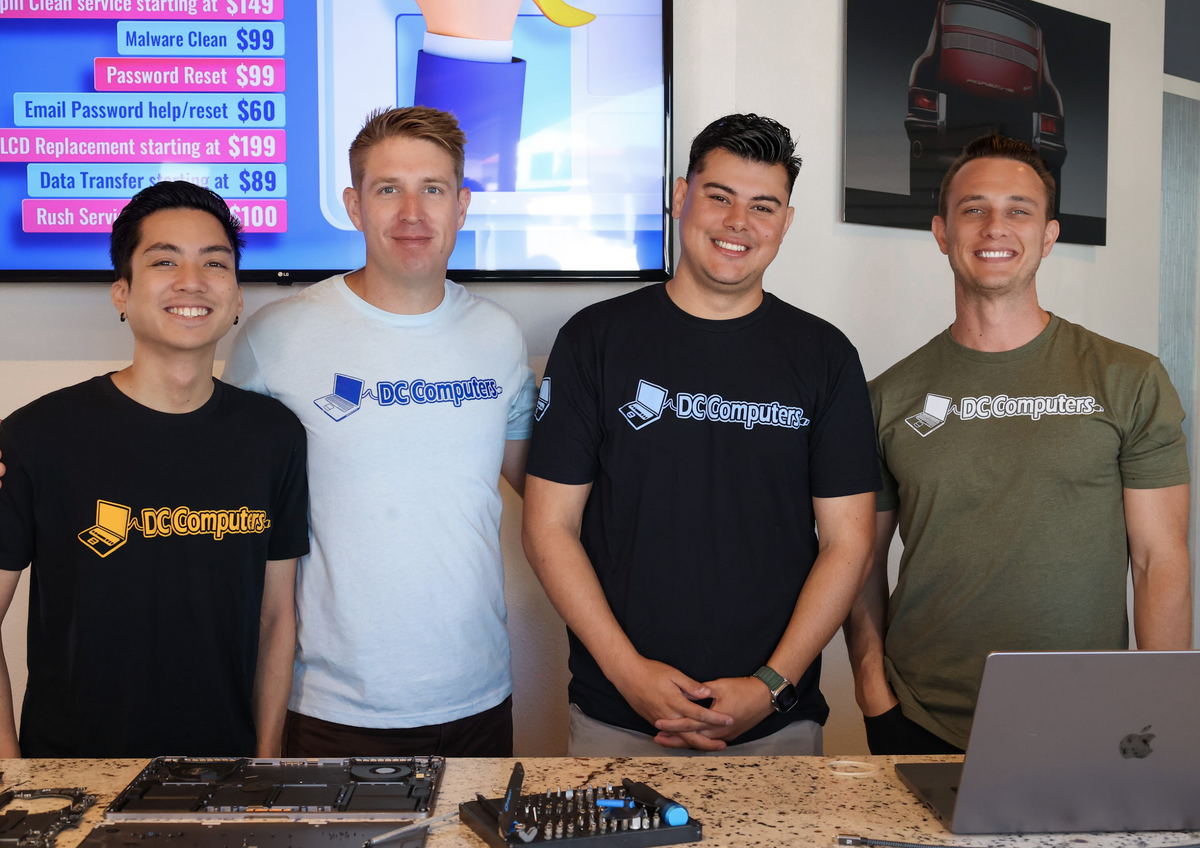
DC Computers is owned and run by Daniel & Chris, yes, the "D" and the "C." When you bring in an infected Mac or PC, you're handed to the same local crew that cleans up malware here all day, every day.
No call centers and no mail-in black holes, just experienced San Diego techs who diagnose honestly, explain what happened in plain English, and treat your computer (and your data) like it's their own.
Most infections are removed same-day, typically 2-4 hours depending on severity. Severe infections or ransomware may take longer. We'll give you a realistic timeline after assessment.
Will I lose my files during virus removal?
We make every effort to preserve your data during cleanup. In most cases, your files remain intact. If the infection damaged files or a clean OS install is needed, we'll discuss options with you first. If needed, our data recovery service can help.
Can you remove ransomware?
Yes, we remove ransomware infections. File recovery depends on the specific ransomware variant, some can be decrypted, others cannot. We'll assess your situation and explain all options honestly.
Do Macs really get viruses?
Yes. Macs are less targeted than Windows but not immune. We regularly remove adware, browser hijackers, and other malware from Macs. If your Mac is acting strange, bring it in.
How do I prevent future infections?
Every cleanup includes basic hardening: software updates, browser security, and removal of vulnerable programs. We also provide guidance on safe computing practices tailored to how you use your computer.
How much does virus removal cost in San Diego?
Simple malware cleanups start around $100-150. Severe infections or ransomware cases may cost more. We always provide a clear quote after assessment, before any work begins, with no hidden fees.
Where is DC Computers located?
We're at 1070 University Ave Ste J101, San Diego, CA 92103 in Hillcrest, near the DMV. Get directions →